


.png)



Introduction
AWS Glue is Amazon's fully managed extract, transform, and load (ETL) service that makes it easy to prepare and load data for analytics. It eliminates the complexity of traditional ETL workflows by automating infrastructure management, schema discovery, and job scheduling so data teams can focus on insights rather than operations.
In 2026, as organizations accelerate their data lake modernization on AWS, AWS Glue has become the backbone of cloud data pipelines. Over 70% of AWS data lake customers use Glue as their primary ETL tool, according to industry adoption surveys.
This comprehensive guide covers everything you need to know about AWS Glue: its architecture, core components, real-world use cases, pricing model, and how it compares to alternatives like AWS EMR and custom data pipelines. Whether you're building a new data lake or optimizing existing workflows, understanding AWS Glue will help you make informed decisions about your ETL strategy.
What is AWS Glue? Definition and core purpose
AWS Glue is a serverless ETL service that automates the entire data preparation workflow. It discovers your data, generates ETL code automatically, and executes jobs without requiring you to manage any infrastructure.
Key characteristics

The primary purpose of AWS Glue is to transform raw, messy data into clean, analytics-ready formats that can be queried by services like Amazon Athena, Amazon Redshift, or AWS QuickSight.
How AWS Glue works: Architecture breakdown
Understanding AWS Glue's architecture helps you leverage its capabilities effectively. The service operates through four interconnected components:
1. AWS Glue data catalog
The Data Catalog is Glue's persistent metadata store. It contains:
- Table definitions for all your data sources
- Database definitions organizing tables logically
- Partition information enabling efficient data querying
- Schema versions tracking changes over time
When you create a crawler in Glue, it scans your data source (like Amazon S3) and automatically populates the Data Catalog with schema information.
2. Crawlers
Crawlers are automated agents that:
- Connect to data sources (S3, DynamoDB, JDBC-compatible databases)
- Extract schema information
- Detect partitions and data formats
- Populate or update the Data Catalog
You can schedule crawlers to run periodically, ensuring your metadata stays current as data evolves.
3. ETL jobs
ETL jobs are the workhorses of AWS Glue. They:
- Read data from sources using the Data Catalog metadata
- Transform data using Python or Scala code (auto-generated or custom)
- Write transformed data to destinations
- Track job execution history and metrics
Glue can automatically generate ETL code based on your source and target schemas, reducing development time by 60-80% for standard transformations.
4. Jobs and job runners
Jobs execute on Glue's serverless Spark environment. The job runner:
- Manages Spark cluster lifecycle
- Allocates resources dynamically based on job requirements
- Handles retries and error recovery
- Provides monitoring through AWS CloudWatch
Core components of AWS Glue Deep Dive
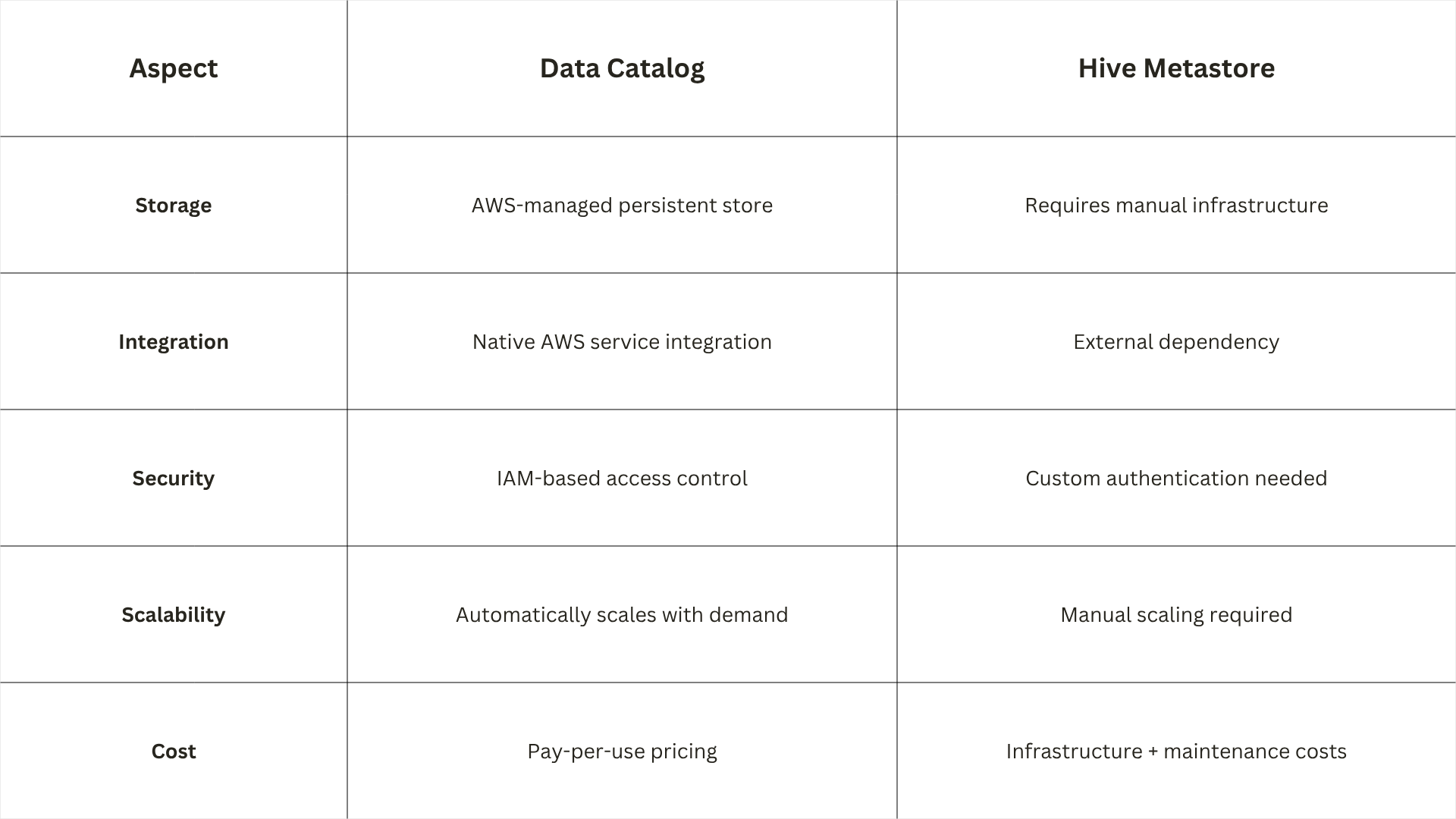
AWS Glue Data catalog vs traditional Hive Metastore
The Data Catalog is functionally similar to Apache Hive's metastore but with significant enhancements:
Crawlers: advanced configuration options
Beyond basic schema discovery, crawlers support:
- Custom classifiers for proprietary data formats
- Multi-row grouping for logs and nested data
- Data format detection (CSV, JSON, Parquet, Avro, ORC)
- Partition wildcard patterns for complex directory structures
- Exclusion patterns to skip unwanted files
ETL job types
AWS Glue supports three job types:
- ETL Jobs: Standard data transformation workflows
- Scripts: Custom PySpark or Scala code without auto-generation
- Notebook Jobs: Interactive development using Glue Workbench
Glue Workbench
Glue Workbench is a visual development environment that provides:
- Interactive notebooks for job development
- Visual data profiling
- Job visualization and monitoring
- Collaborative features for team development
AWS Glue use cases in real world scenarios
AWS Glue serves diverse industries and use cases. Here are the most common applications:
1. Data lake modernization
Scenario: Organizations migrating from legacy data warehouses to AWS data lakes
Glue implementation
- Crawlers discover existing data in S3 or on-premises databases
- ETL jobs transform data into analytics-friendly formats (Parquet, Avro)
- Data Catalog enables schema-on-read querying with Athena
Business impact: 40-60% reduction in data preparation time
2. Real-time data streaming integration
Scenario: Combining batch and streaming data for unified analytics
Glue implementation
- Glue Streaming Jobs consume data from Amazon Kinesis or Kafka
- Transformations apply in real-time using Spark Streaming
- Output written to S3, DynamoDB, or Redshift
Use example: Fraud detection systems processing millions of transactions per second
3. Multi-source data integration
Scenario: Aggregating data from disparate systems (SAP, Salesforce, SQL databases, S3)
Glue implementation
- Crawlers connect to JDBC sources and cloud storage
- ETL jobs merge, clean, and standardize data
- Unified output in data lake for analytics
Business value: Single source of truth for enterprise analytics
4. Automated data quality enforcement
Scenario: Ensuring data quality before analytics consumption
Glue implementation
- ETL jobs apply validation rules (null checks, format validation, range checks)
- Bad data routed to quarantine buckets
- Quality metrics logged to CloudWatch
Outcome: 90%+ reduction in data quality issues affecting downstream analytics
5. Serverless data transformation for machine learning
Scenario: Preparing training data for AWS SageMaker models
Glue implementation
- Crawlers discover raw data in multiple formats
- ETL jobs perform feature engineering, normalization, and encoding
- Clean datasets exported to S3 for SageMaker ingestion
Efficiency: Eliminates 70% of manual data preparation work for ML teams
6. Cost-optimized ETL for small to midsize businesses
Scenario: Companies without dedicated ETL infrastructure budgets
Glue implementation
- No upfront infrastructure investment
- Pay only for job execution time
- Automatic scaling eliminates over-provisioning
Cost savings: 50-70% compared to traditional ETL tools with fixed infrastructure
When to choose AWS Glue
- You need quick ETL setup with minimal configuration
- Your team lacks Spark expertise (Glue auto-generates code)
- You want serverless operations without cluster management
- Your workload is primarily ETL (extract, transform, load)
- You're building AWS data lakes with Data Catalog integration
When to choose AWS EMR
- You need multiple big data frameworks (Hadoop, Hive, Flink)
- You have complex custom Spark jobs requiring full control
- Your team has strong Spark/Python expertise
- You need long-running clusters for iterative processing
- You're doing advanced machine learning or real-time streaming at scale
Cost comparison example
For a typical daily ETL job processing 100 GB of data:
- AWS Glue: ~$15-25 (pay per DPS-second, no idle costs)
- AWS EMR: ~$40-60 (cluster runs for 2-3 hours + idle time)
Glue is typically 40-50% cheaper for standard ETL workflows.
AWS Data Pipeline vs AWS Glue: Which should you use?
AWS previously offered AWS Data Pipeline, but it's now in maintain-only mode. AWS Glue is the recommended replacement.
AWS Data Pipeline status
- Status: Maintain-only (no new features since 2021)
- Migration path: AWS recommends migrating to AWS Glue
- Limitations: No serverless architecture, requires EC2 infrastructure, limited Spark support
Why AWS Glue is superior

Migration from data pipeline to Glue
If you're still using AWS Data Pipeline:
- Audit existing pipelines and document transformation logic
- Recreate crawlers in Glue for your data sources
- Convert pipeline definitions to Glue ETL jobs
- Test thoroughly with sample data
- Switch production to Glue workflows
AWS provides migration guides and automated tools for this transition.
AWS Glue pricing model and cost optimization
How AWS Glue pricing works
AWS Glue uses a pay-per-use model based on:
- Data Processing Units (DPUs): Compute resources consumed during job execution
- Crawler Units: Costs for crawler runs (per hour)
- Data Catalog Storage: Monthly cost for metadata storage (first 1 GB free)
DPU pricing (2026)

Cost optimization strategies
1. Use Glue flex jobs for batch workloads
For non-time-sensitive ETL, Flex Jobs reduce costs by 85% compared to standard DPUs.
2. Optimize DPU allocation
- Start with automatic DPU estimation
- Monitor job metrics in CloudWatch
- Tune DPU count based on actual performance
- Avoid over-provisioning (wastes money) or under-provisioning (slow jobs)
3. Partition data strategically
- Partition large datasets in S3 by date, region, or category
- Reduces data scanned per job
- Lowers DPU consumption by 30-50%
4. Use efficient data formats
- Convert CSV/JSON to Parquet or Avro
- Columnar formats reduce storage by 60-80%
- Faster reading = fewer DPUs used
5. Schedule crawlers smarter
- Run crawlers only when data changes significantly
- Use event-based triggers instead of fixed schedules
- Reduces crawler costs by 40-60%
Real-world cost example
Company: Midsize analytics firm processing 500 GB daily
Without optimization
- Standard DPUs: ~$120/month
- Crawler runs: ~$30/month
- Total: ~$150/month
With optimization
- Flex Jobs for batch: ~$20/month
- Optimized crawler schedule: ~$12/month
- Partitioned data: 40% DPU reduction
- Total: ~$32/month
Savings: 78% cost reduction
AWS Glue integration with other AWS services
AWS Glue works seamlessly with the broader AWS ecosystem. Here are key integrations:
Data sources Glue supports

Analytics and query integrations
- Amazon Athena: Query Glue Data Catalog directly using SQL
- Amazon Redshift: Load transformed data for analytics
- AWS QuickSight: Visualize Glue-prepared data
- Amazon EMR: Use Glue Data Catalog as Hive Metastore
Machine Learning integrations
- AWS SageMaker: Export prepared datasets for model training
- Amazon Bedrock: Prepare data for AI/LLM applications
Monitoring and security
- AWS CloudWatch: Monitor job metrics, set alerts
- AWS CloudTrail: Track API usage and governance
- IAM: Control access to Glue resources
- KMS: Encrypt data at rest and in transit
Step-by-step: building your first AWS Glue ETL job
Follow this practical guide to create a simple ETL pipeline:
Step 1: Prepare your data source
- Upload sample data to Amazon S3 (CSV, JSON, or Parquet)
- Ensure proper bucket permissions for Glue access
Step 2: Create a crawler
- Navigate to AWS Glue Console → Crawlers → Create crawler
- Name: s3-data-crawler
- Choose Data store: S3
- Specify your S3 path
- Configure IAM role with S3 read permissions
- Set Frequency: Run once (or schedule)
- Create Data Catalog table: raw_sales_data
- Click Finish
Run the crawler to populate the Data Catalog.
Step 3: Generate ETL job
- Go to Jobs → Create job
- Job type: ETL job
- Name: transform-sales-data
- Choose Glue version: 4.0 (latest Spark 3.5)
- Select IAM role with Glue and S3 permissions
- Data source: Select raw_sales_data from Data Catalog
- Data target: Choose S3 path for output (Parquet format)
- Click ETL code (Auto-generate ETL code)
- Review generated Python/Spark script
- Save job
Step 4: Run and monitor the job
- Click Run job
- Monitor progress in Job runs tab
- Check CloudWatch for metrics (duration, DPU usage, errors)
- Verify output in target S3 bucket
Step 5: Query transformed data
- Open Amazon Athena
- Select database from Glue Data Catalog
- Run SQL query:
sql
SELECT product_category, SUM(sales_amount)
FROM transformed_sales_data
WHERE sale_date >= '2026-01-01'
GROUP BY product_category
You now have analytics-ready data.
Common AWS Glue challenges and how to solve them
Challenge 1: Job timeout or slow performance
Root causes
- Under-provisioned DPUs
- Unpartitioned large datasets
- Inefficient data formats (CSV vs Parquet)
Solutions
- Increase DPU count (start with auto-estimation, then tune)
- Partition data by date or category
- Convert to Parquet/Avro format
- Enable job metrics to identify bottlenecks
Challenge 2: Schema evolution issues
Root causes
- Data source schema changes without Data Catalog update
- Crawler not running after data changes
Solutions
- Schedule crawlers to run daily/weekly
- Use schema evolution settings in Glue jobs
- Enable auto-update for Data Catalog tables
- Test with sample data before production deployment
Challenge 3: High costs
Root causes
- Over-provisioned DPUs
- Frequent crawler runs
- Unoptimized data formats
Solutions
- Use Flex Jobs for batch workloads
- Optimize DPU allocation based on metrics
- Partition data strategically
- Convert to columnar formats
Challenge 4: Error handling and data quality
Root causes
- Missing validation logic in ETL scripts
- No quarantine mechanism for bad data
Solutions
- Add data quality checks in ETL code (null checks, format validation)
- Route bad data to quarantine S3 bucket
- Log quality metrics to CloudWatch
- Set up alerts for error thresholds
AWS Glue best practices for 2026
1. Use Glue workbench for development
Glue Workbench provides:
- Interactive notebook development
- Visual data profiling
- Collaborative features
- Faster debugging than raw console
2. Implement CI/CD for Glue jobs
- Store ETL scripts in AWS CodeCommit or GitHub
- Use AWS CodePipeline for automated deployment
- Test jobs in staging before production
- Version control all transformations
3. Monitor with CloudWatch dashboards
Create custom dashboards tracking:
- Job duration trends
- DPU utilization
- Error rates
- Cost per job
Set alerts for anomalies (e.g., job duration > 2x average)
4. Leverage job bookmarks
Job bookmarks prevent processing the same data twice:
- Enable for incremental data loads
- Automatically track processed files
- Prevents data duplication
5. Use parameterized jobs
- Pass parameters (dates, regions) at runtime
- Reuse same job for multiple scenarios
- Reduces code maintenance
6. Secure your glue environment
- Use IAM roles with least-privilege permissions
- Encrypt data with KMS keys
- Enable VPC endpoints for private connectivity
- Audit with CloudTrail
Future of AWS Glue: Trends and roadmap
AWS continues investing in Glue capabilities. Key trends for 2026-2027:
1. Enhanced AI/ML integration
- Auto-generated transformation logic using machine learning
- Smart schema detection for complex data formats
- Anomaly detection in data quality
2. Serverless spark improvements
- Faster job startup times (under 30 seconds)
- Better DPU optimization algorithms
- Support for Spark 3.6+ features
3. Real-time ETL capabilities
- Enhanced Glue Streaming Jobs for sub-second latency
- Native Kafka Connect integration
- Change Data Capture (CDC) support for databases
4. Cost transparency tools
- Per-job cost breakdown in CloudWatch
- Predictive cost modeling before job execution
- Automated cost optimization recommendations
5. Multi-cloud support
- Expanded connectors for Azure and Google Cloud
- Unified Data Catalog across cloud providers
- Hybrid data lake support
Frequently Asked Questions about AWS Glue
Q: Is AWS Glue suitable for small businesses?
A: Yes. AWS Glue's serverless architecture makes it ideal for small businesses because:
- No upfront infrastructure investment
- Pay only for what you use
- Automatic scaling eliminates over-provisioning
- Auto-generated code reduces developer expertise requirements
Typical small business costs: $20-50/month for moderate ETL workloads.
Q: Can AWS Glue handle real-time data?
A: Yes, through Glue Streaming Jobs. They support:
- Real-time consumption from Kinesis and Kafka
- Sub-minute latency transformations
- Continuous output to S3, DynamoDB, or Redshift
Best for: Fraud detection, IoT monitoring, real-time analytics.
Q: How does AWS Glue compare to third-party ETL tools like Informatica or Talend?
A:

Glue is better for AWS-native workloads; third-party tools excel in multi-cloud environments.
Q: Does AWS Glue support custom Python libraries?
A: Yes. You can:
- Upload libraries to S3 and reference in jobs
- Use PyPI packages via --extra-py-files parameter
- Create custom Glue personalities for specialized needs
Limitation: Libraries must be compatible with Spark Py4J.
Q: What is the maximum data size AWS Glue can process?
A: AWS Glue is virtually unlimited because:
- Serverless Spark scales automatically
- No single-job size limits
- Processes petabytes through partitioning
Practical limit: Depends on DPU allocation and time budget. Typical enterprise jobs process 10-100 TB/day.
Is AWS Glue right for your ETL needs?
AWS Glue is the best choice for AWS-native ETL workflows when you need:
- Serverless operations without infrastructure management
- Auto-generated code reducing development time
- Native Data Catalog integration for data lakes
- Cost efficiency with pay-per-use pricing
- Broad connectivity to hundreds of data sources
When to choose AWS Glue
- You're building or modernizing an AWS data lake
- Your team has limited Spark expertise
- You want quick setup (minutes vs. days)
- Your workload is primarily ETL (not complex analytics)
- You prioritize cost optimization over custom control
When to consider alternatives
- You need multi-cloud ETL (consider Talend, Informatica)
- You require complex custom Spark jobs (consider AWS EMR)
- You have existing ETL infrastructure with strong team expertise
- You need non-Spark frameworks (Hadoop, Flink) → AWS EMR
For most organizations using AWS for data analytics, AWS Glue provides the fastest path to analytics-ready data with the lowest operational overhead.
Conclusion
AWS Glue is a strong fit for teams that want to build and manage ETL pipelines on AWS without taking on the overhead of infrastructure management. Its serverless design, Data Catalog, crawler-based discovery, and tight integration with services like S3, Athena, Redshift, and EMR make it especially valuable for modern data lake and analytics workloads. For organizations comparing what is aws glue against EMR or older pipeline approaches, the biggest advantage is usually speed, simplicity, and lower operational burden.


.png)


